
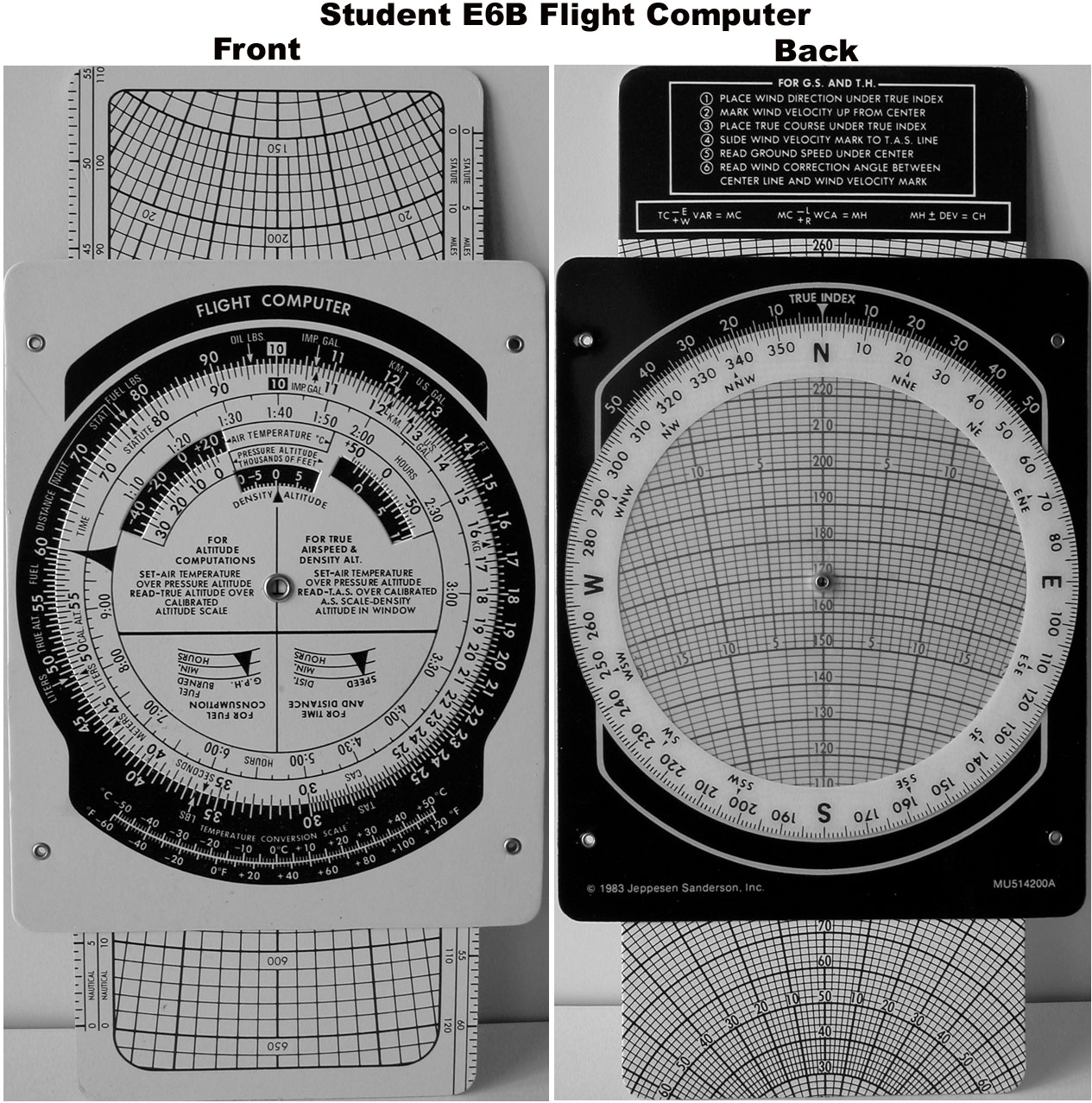
As pilots, we all know that planning a flight can be a daunting task. From selecting the correct route to account for weather conditions, there are many variables to consider and it’s essential to have the right tools, an E6B, to help us make informed decisions.
One of the most essential tools we use for flight planning is the electronic flight computer or E6B. It’s a versatile, durable, and reliable device that can help us with a wide range of calculations and conversions. In this article, we’ll dive into what an E6B flight computer is, its different components, and how to use it to plan a flight.
What is an Electronic Flight Computer?
An electronic flight computer is an electronic version of the traditional E6B flight computer. It can perform the same calculations and conversions in a matter of seconds, making it a faster and more convenient option for pilots who prefer to use a digital device.
The Specific Components
The E6B flight computer has two sides; the wind side and the computer side. On the wind side of the computer, we can calculate ground speed, true course, and wind correction angle. While on the computer side, we can calculate time en route, fuel consumption, and the true airspeed.
The Wind Side
To use the wind side of the computer, we need to enter the wind direction and speed into the top of the device pointing into the wind, then turn the outer wheel until the wind direction and the true course align. Once this is done, we can read the true heading the aircraft should follow.
The Computer Side
To use the computer side of the E6B, we first need to input the true airspeed of the aircraft into the middle of the device. Then we can use the outer wheel to calculate the distance traveled, fuel consumption, and time en route by aligning the values.
Using the E6B Flight Computer
To use this tool, we need to have a basic understanding of the calculations we need to make. These can include fuel consumption, distance covered, ground speed, and true airspeed values.
Here are some quick steps to use an E6B flight computer:
- Determine and input the values you know, such as wind direction, ground speed, and true airspeed, into each of the components.
- Rotate the different components on the computer until the desired value aligns.
- Use the results to make informed planning decisions and to make adjustments to your flight plan as required.
Random fact: The E6B flight computer was first introduced in the early 1930s and has been a pilot’s favorite ever since.
The Electronic Flight Computer, E6B flight computer, is a valuable tool for pilots to calculate a variety of calculations related to flight planning. It’s essential for pilots to know how to use E6B flight computer to make accurate and informed planning decisions. Moreover, its durability and reliability have made it a favorite among pilots for nearly a century. Personally, the E6B has always been somewhat intimidating to me so if you have any questions don’t hesitate to reach out to Angle of Attack for those answers.

ON THE SAME TOPIC

IFR vs VFR: The Two Sets of Rules Every Pilot Flies By
IFR vs VFR: The Two Sets of Rules Every Pilot Flies By 19 min read Last updated June 2026 · Chris Palmer The difference between IFR and VFR is which set of rules you fly under. VFR — visual flight rules — lets you navigate by looking outside and staying clear of clouds in good […]
 Read more
ASOS vs AWOS vs ATIS: How to Pull the Right Weather Before You Fly
ASOS vs AWOS vs ATIS: How to Pull the Right Weather Before You Fly 13 min read Last updated June 2026 · Chris Palmer The difference comes down to who is talking and what the broadcast covers. ASOS and AWOS are automated, computer-generated weather observations of the conditions right at the field. ATIS is a […]
Read more 
What Is RNAV Navigation? Area Navigation for VFR Pilots
What Is RNAV Navigation? Area Navigation for VFR Pilots 17 min read Last updated June 2026 · Chris Palmer RNAV — Area Navigation — is a method that lets an aircraft fly any desired path within the coverage of ground- or space-based navigation aids, rather than being forced to fly directly to and from stations. […]
Read more 
NDB and ADF Explained: The Oldest Radio Nav System You Still Need to Understand
NDB and ADF Explained: The Oldest Radio Nav System You Still Need to Understand 16 min read Last updated June 2026 · Chris Palmer An NDB (non-directional beacon) is a ground-based radio transmitter that sends a signal in all directions, and an ADF (automatic direction finder) is the cockpit receiver whose needle points straight at […]
Read more 
Stay Connected
Be the very first to get notified when we publish new flying videos, free lessons, and special offers on our courses.
